
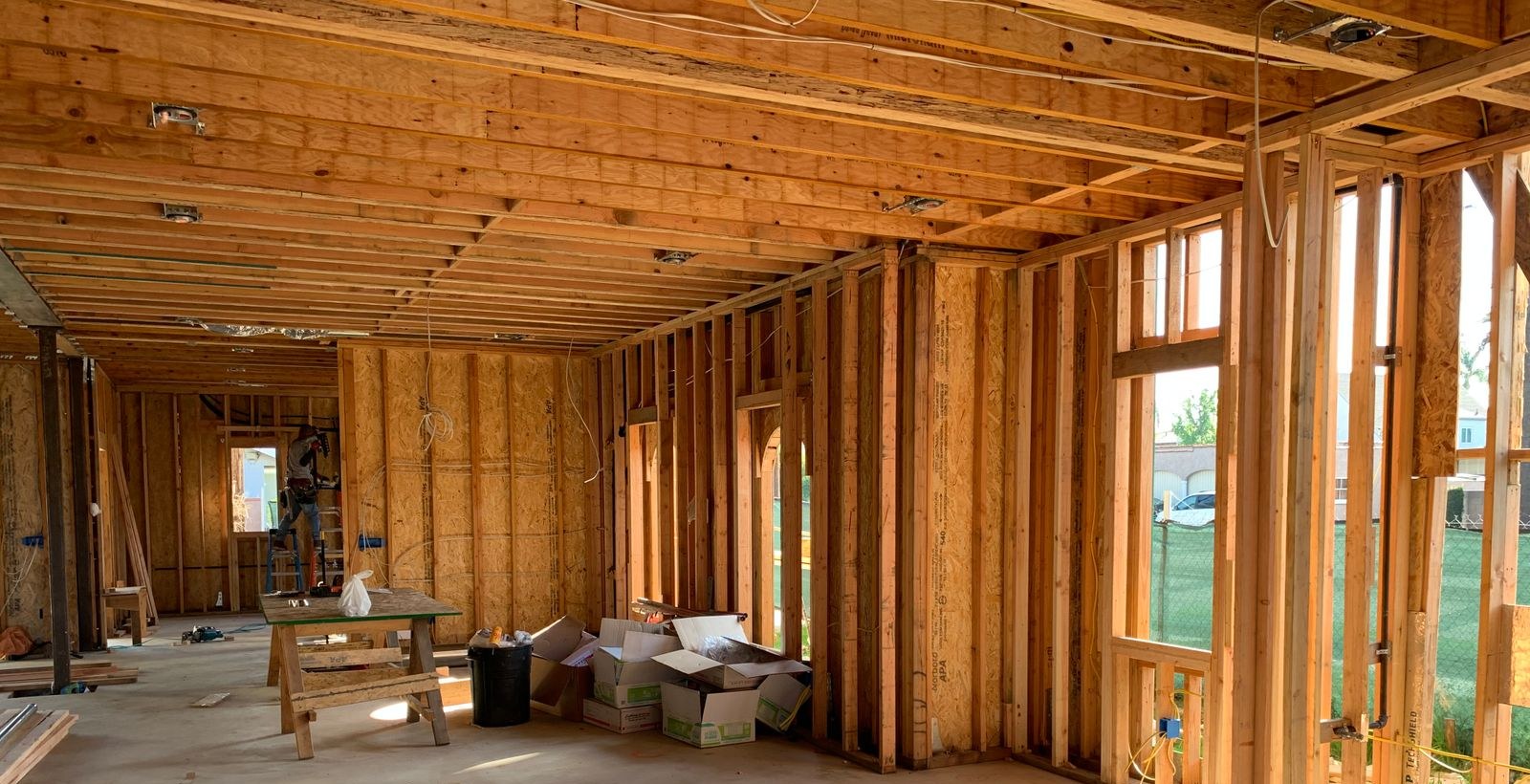
Wireless cameras and alarms can be jammed, and they can simply fail. A camera on a cable cannot be jammed, and it does not run out of battery. The difference costs almost nothing while the stud bays are open, and it is brutally expensive once the drywall is up.
Most homeowners meet this subject in the wrong order. They finish the drawings, start framing, and then an installer walks the house and asks where the rack goes, how many cables each room needs, and whether there is a conduit to the far corner of the lot. By then every honest answer is a compromise. The decisions in this article are cheap exactly once — before the drawings are finished — and they are all one decision made at one moment.
Why this has to be decided before the drawings are finished
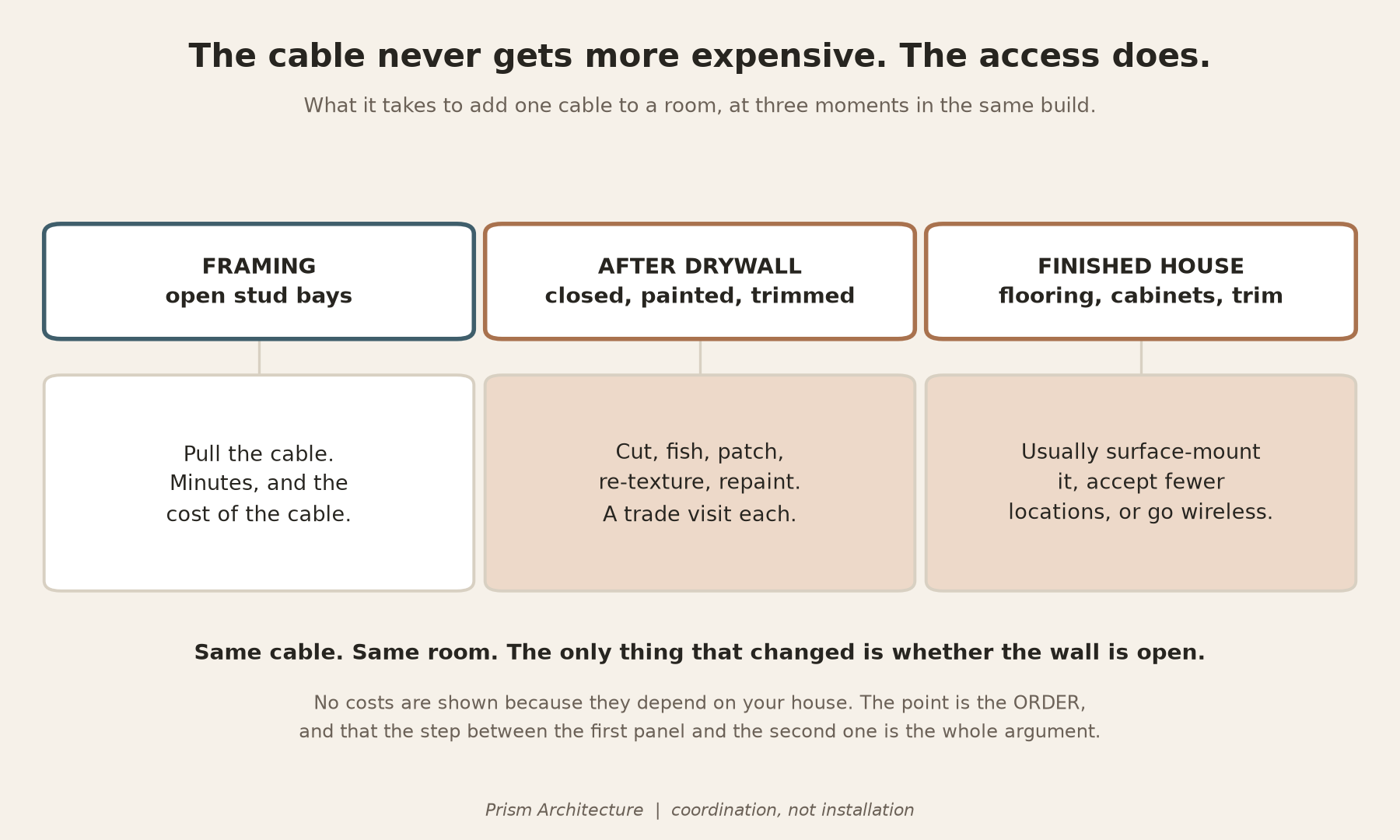
Pulling a cable through an open stud bay takes a few minutes and costs a few dollars. Pulling the same cable after the drywall, paint and trim are in means cutting, patching, repainting, and often giving up and running it somewhere visible instead. The cable never got more expensive. The access did.
That asymmetry is the whole argument, and it is why this is an architectural question before it is a technology question. What goes on the drawings is not the brand of camera — it is the pathway, the power, the space and the sequence. Those four decide what is still possible in five years, when the camera you bought is discontinued and its replacement wants more bandwidth and more power.
Wired beats wireless, and the police say so
This is not a theoretical preference. In 2024 the Los Angeles Police Department warned residents in its Wilshire division after a run of burglaries in which wireless cameras and alarms were knocked out before entry, and its own recommendation to homeowners was to hard-wire the alarm system. Police in Edina, Minnesota attributed nine burglaries in six months to the same technique, and noted the offenders picked unoccupied houses. In December 2025 police in Bellaire, Texas described suspects approaching a camera carrying a bag they believed held a jammer.
You do not need to know anything about how that is done. You need to know that a wireless camera depends on a single radio link, and that a single radio link is a single point of failure — whether it fails because someone interfered with it, because the router rebooted, because the battery died, or because your internet went down.
The design answers are unglamorous and they all live on a drawing:
- Cameras and the alarm panel on cable, powered over that same cable. No batteries to replace, nothing to re-pair, nothing to interfere with.
- Recording that survives the outage — a recorder in the house, or storage in the camera, so losing the internet costs you the live view and not the footage.
- Overlapping coverage, so one failed camera is not a blind spot.
- An alert when a device goes offline. A camera that stops reporting should be an event, not something you discover afterwards.
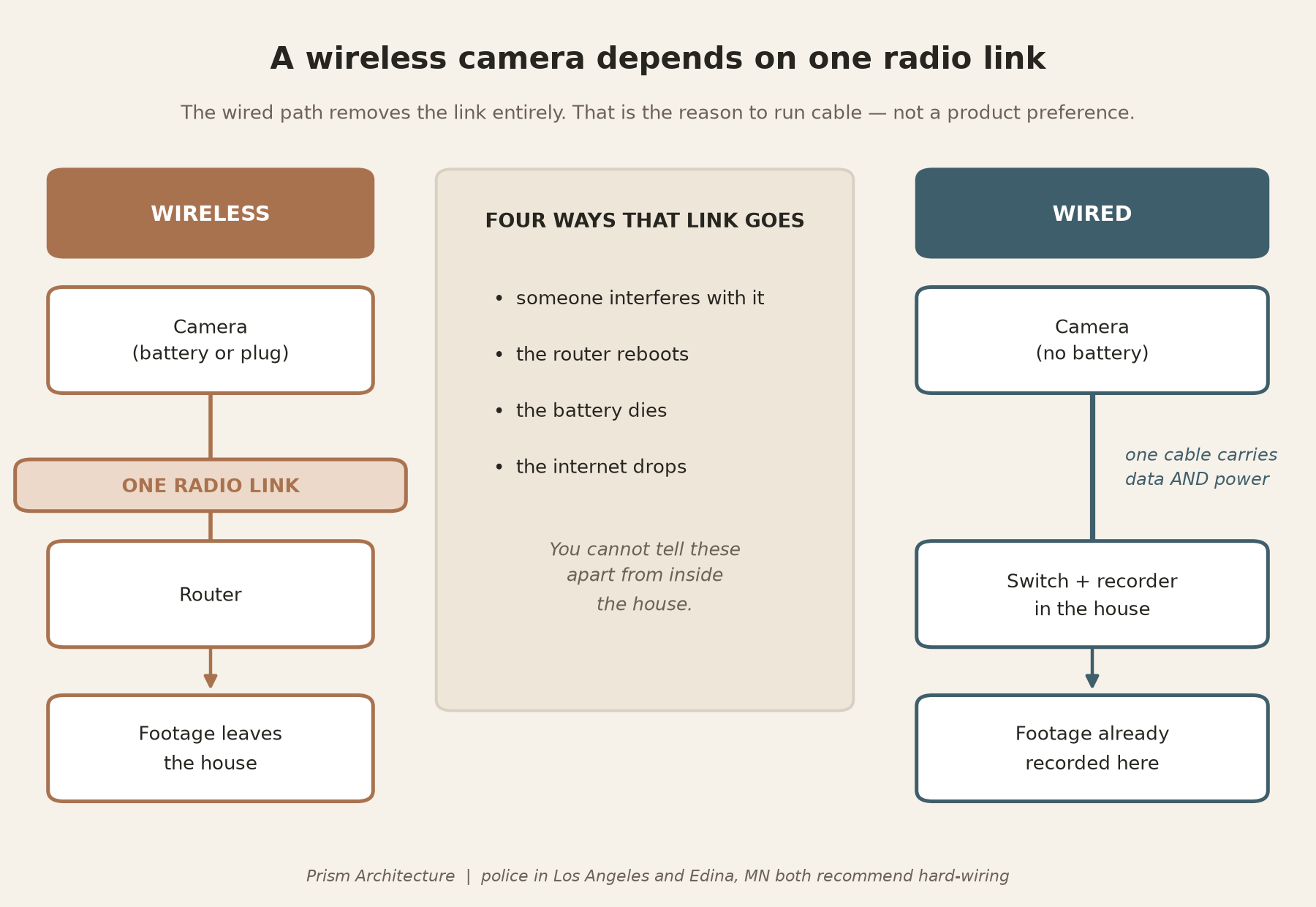
Note what is not on that list. Devices sold to interfere with radio signals are illegal in the United States — the Communications Act bars marketing them under § 302(b) and operating them under § 333, the FCC will not certify one, and importing one is itself unlawful. This firm is not recommending one and you should not buy one. The point of this section is the opposite: the reason to run a cable is that it takes the radio link out of the equation entirely.
The Florida permitting rule that quietly pushes you toward wireless
Here is the part no one tells you, and it cuts against everything above.
Under Florida Statute § 553.793, subsection (2), a permit is not required to install, maintain, inspect, replace or service a wireless alarm system — the statute defines a wireless system at (1)(d) as a burglar alarm or smoke detector that is not hardwired. A hardwired system is a different animal. Subsection (1)(b) defines a “low-voltage alarm system project” to include video cameras and closed-circuit television that are hardwired and operating at low voltage, and subsection (7) requires the contractor to file a Uniform Notice of a Low-Voltage Alarm System Project with the local enforcement agency within 14 days after finishing the work.
So the wireless option is genuinely the path of least administrative resistance. That is precisely why it gets chosen by default — and it is the choice you cannot undo cheaply. The paperwork difference is a few days of a contractor’s attention. The wiring difference is the rest of the life of the house.
The cable: what to actually specify
Category 5 is gone. The minimum is Category 6A
If you have read an older article, or if your builder still says “Cat 5,” that spec has been obsolete for a long time. Category 5 was deprecated in 2001 when the TIA standard defined Category 5e and stopped recognising the original, and it was superseded outright when ANSI/TIA-568-C.2 published in August 2009. It is not merely dated. It is two revisions gone.
The current residential standard is ANSI/TIA-570-D, published in July 2018, and it recognises Category 6A as the minimum category of balanced twisted-pair cabling. The standard also tells you how much to run, by grade:
- Grade 1 — one Category 6A cable and one coaxial cable to each outlet location.
- Grade 2 — two Category 6A cables and one coaxial cable. This is the realistic baseline for a house with cameras, access points and a television in more than one room.
- Grade 3 — two Category 6A, one coaxial, and a two-fibre optical cable, which at this grade is required rather than optional.
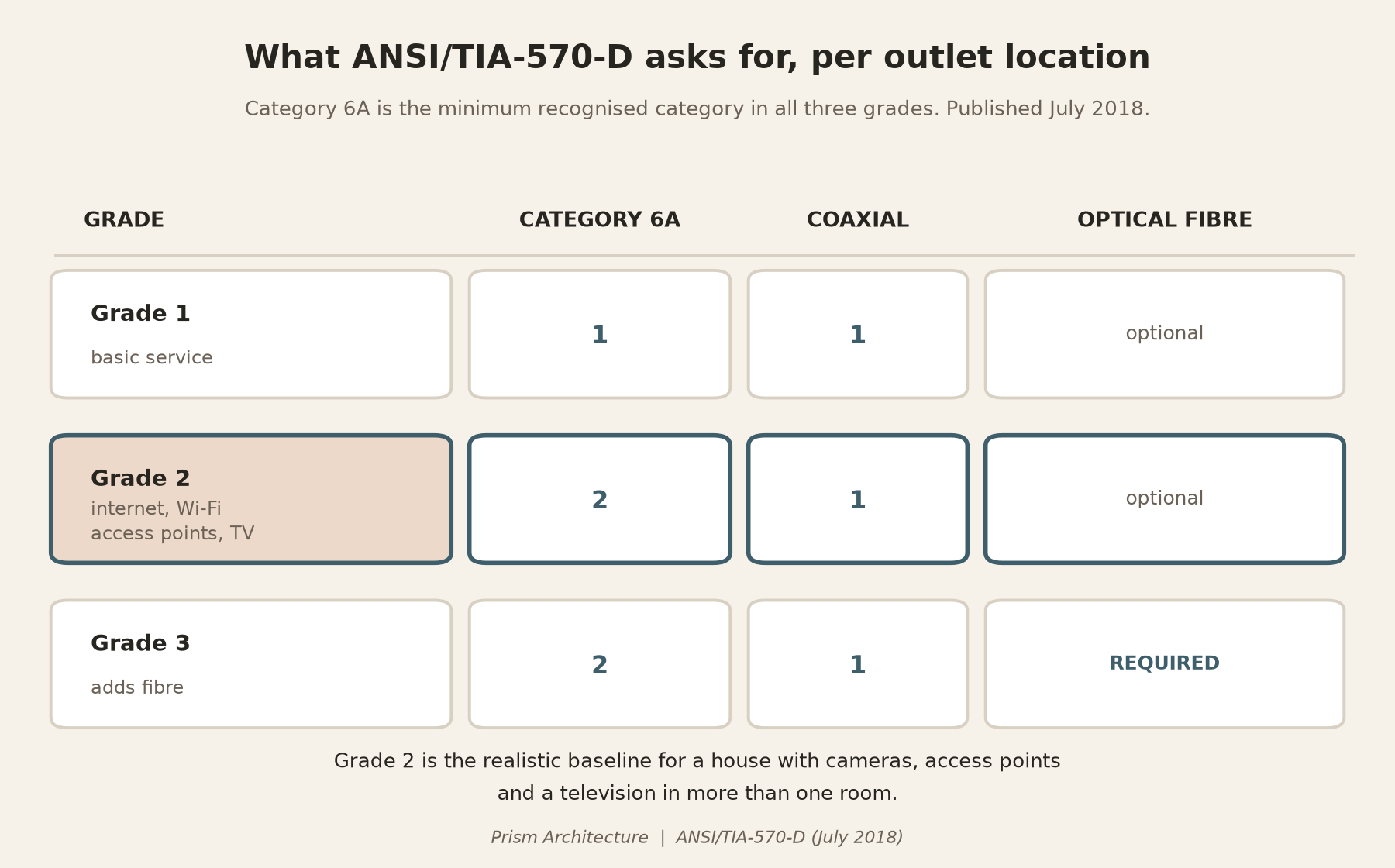
Specify Category 6A and stop thinking about it. It is the minimum in the standard your installer works to, the price difference at rough-in is a rounding error against the cost of the house, and it removes the only part of this list you would otherwise have to revisit.
Why 6A rather than 6, honestly
There is a second, independent reason, and it is worth understanding rather than taking on faith.
Cameras and access points are now powered through the same cable that carries their data. The IEEE standards define four power levels — roughly 15 W, 30 W, 60 W and 90 W at the source, with the two higher ones energising all four pairs. Pushing power down a copper pair makes it warm, and warm cable carries data less well. The industry guidance on this, TIA TSB-184-A, recommends Category 6A for new installations where power over the cable is expected. In the underlying testing, 6A tolerated the largest bundle before exceeding the accepted temperature rise, and at the highest power level it was the only category that stayed inside it.
Be straight about the scale of this, though. Those bundle tests are commercial-building conditions — dozens of cables strapped together in a tray. A house does not do that. In a house the heating argument is a reason for confidence rather than a crisis, and the real reason to specify 6A is simpler: it is what the standard says, and you are not going to rewire.
Conduit and pathways: the part that outlives the cable
Every category of cable in this article will eventually be superseded. A pathway will not.
A spare conduit from the equipment location to the attic, to the crawl space or slab edge, to the garage, and out to wherever a gate, a camera or a detached structure might one day go, is the single highest-value item on this list. It costs very little in an open wall. It is the only thing that makes the next decision cheap, and it is the item most often left off entirely because nothing is going in it on day one.
This is also the clearest example of what belongs on a drawing rather than in a product brochure. Pathways, sleeves, and the places where a future cable can get from A to B are coordination, not technology.
Where the equipment actually lives
“Where does the rack go” sounds like a detail. It is a room-planning decision with four constraints that fight each other:
- It makes heat. A switch powering a dozen cameras is a small space heater that runs continuously. In Florida it needs conditioned air — an unvented closet or an uninsulated garage shortens the life of everything in the rack.
- It makes noise. Fans run all the time. Sharing a wall with a bedroom headboard is a decision you make once and regret nightly.
- It needs its own circuit, with the receptacle where the equipment is, not around a corner on an extension lead.
- Someone has to reach it — service access front and ideally back, with room to stand. The cupboard under the stairs is the classic mistake: everything fits, and nothing can be worked on.
Get those four onto the floor plan and the rest is procurement. Miss them and the equipment ends up wherever there happened to be space, which is usually the garage.
Backup power: three different jobs, not three options
This is where homeowners most often think they are choosing, when they are not.
- A UPS bridges the gap with no interruption at all, for minutes. Its job is to keep the recorder, the router and the alarm panel alive through a flicker, and to shut the equipment down gracefully rather than abruptly.
- A battery system covers hours, silently, and can be recharged from solar.
- A standby generator covers days, as long as it has fuel, and is the only one of the three that will run air conditioning in a long outage.
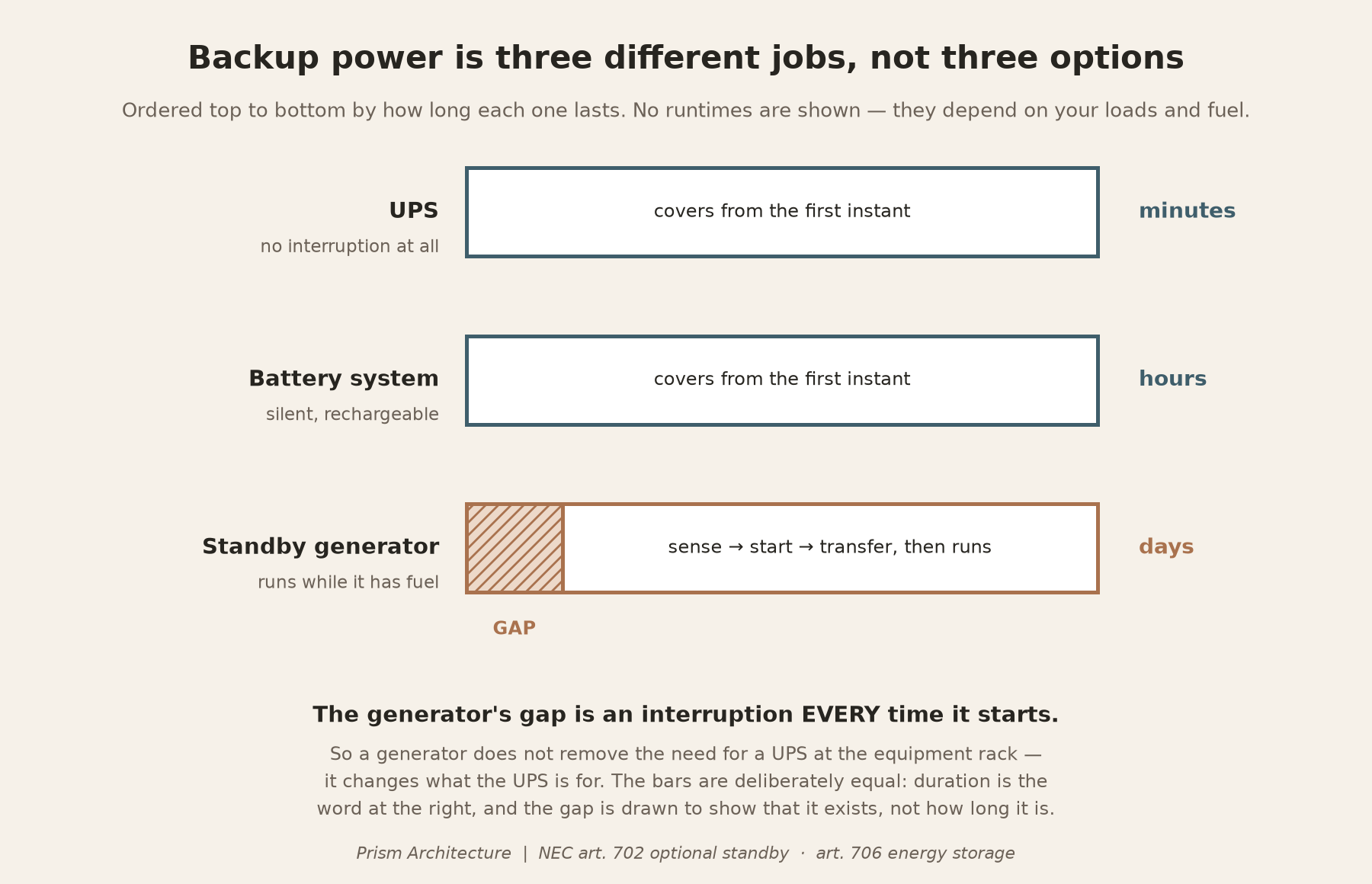
The reason this matters architecturally is the gap. A standby generator is not instantaneous — it has to sense the outage, start, and transfer. For a refrigerator that is irrelevant. For the recorder holding your footage and the panel watching your doors, it is an interruption every single time the generator starts. A generator does not remove the need for a UPS at the rack. It changes what the UPS is for.
In code terms a residential generator is normally an optional standby system under Article 702 of the National Electrical Code — life safety does not depend on it — and battery storage sits under Article 706 with its own listing and local fire-marshal requirements. The consequence for your drawings: whether the generator carries the whole house automatically or only selected circuits changes how it must be sized, and it changes where the transfer equipment and any subpanel go. That is a decision about panel locations and wall space — a drawing decision, made now.
There are deliberately no runtimes, prices or kilowatt-hours here; those depend on your loads, your fuel and this year’s equipment.
Keep the gadgets off the network your laptop is on
The security question people ask about is cameras. The security question that matters more is what else those devices can reach.
Smart devices are a mixed population. Some get firmware updates for years; some were abandoned by their manufacturer before you installed them. The federal guidance on this is unusually direct — the Cybersecurity and Infrastructure Security Agency tells consumers to consider placing these devices on a separate and dedicated network, and NIST’s device-security guidance explains the reasoning: where a device cannot itself be secured, segmenting it off logically keeps its usefulness while limiting what it can touch.
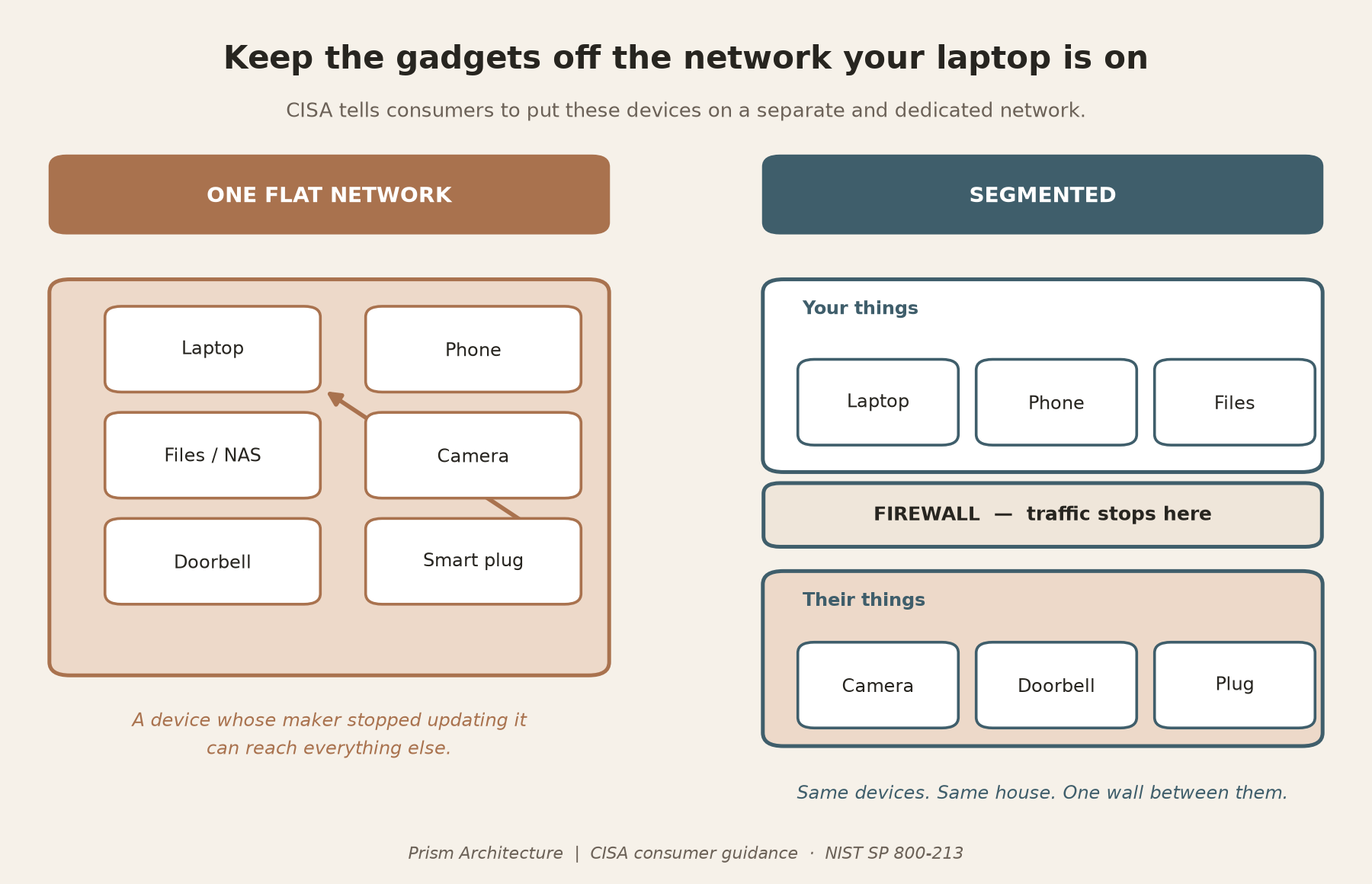
Two cheap habits go with it. CISA notes that default passwords on devices and routers are published online or printed on the hardware itself, so they are not protection — change them, change the default network name so it does not advertise your equipment, and turn off WPS. And keep the router’s firmware current; it is the device most worth hardening and the one people forget exists.
The pre-planning piece is small but real: separating networks properly needs capable equipment at the rack, which means space, a port count and a circuit — decided with everything else.
What this is not
This article is not an offer to design or install a security, alarm or low-voltage system, and this firm does not do that work.
Florida licenses it separately and deliberately. Alarm and low-voltage work falls under Chapter 489, Part II of the Florida Statutes, and the Electrical Contractors Licensing Board’s own guidance is that wiring under 98 volts inside a structure requires a licensed contractor holding an Electrical Contractor, Alarm System Contractor I or II, Limited Energy Specialty or Residential Electrical Specialty licence, with the exemptions listed at § 489.503. A licensed specialty contractor designs and installs the system.
What we do is the coordination that has to happen before they arrive: conduit and pathways, rack location and the space around it, power and circuits, device locations on the plan, and the sequencing so the low-voltage rough-in lands in the right week — after framing, before insulation and drywall. Getting that wrong is the single most common reason this work ends up surface-mounted, undersized, or simply not done.
Where to start
If your drawings are not finished, you are early, and that is the only good news in this article. Five things, in this order:
- Mark the equipment location on the floor plan and check it against heat, noise, power and access.
- Mark every device location — cameras, access points, televisions, doorbell, gate.
- Specify Category 6A, two runs plus coax to each location, and decide whether you want the fibre.
- Draw the spare pathways — attic, slab edge, garage, and out to the property line.
- Decide which circuits matter in an outage, because that decides panel and transfer equipment locations.
Then bring in the licensed specialty contractor, with a drawing that tells them what they are working with instead of asking them to guess.
Frequently asked questions
Can I just add this later?
Sometimes, badly. Attics and crawl spaces give you some routes after the fact; a single-storey slab with no attic access gives you almost none. Retrofitting usually means visible cable, fewer locations than you wanted, or the wireless devices you were trying to avoid.
Do I need a permit for all this?
It depends what you install. Under § 553.793 a wireless alarm system needs no permit, while a hardwired low-voltage alarm project requires your contractor to file a Uniform Notice with the local enforcement agency within 14 days of finishing. Your jurisdiction governs, and your contractor files it — not you.
Isn’t wireless fine if my internet is good?
For convenience devices, usually. For anything whose job is to work on the worst night of the year, no. The question is not whether it works on a normal Tuesday — it is what the device does when the link is gone, and for most consumer cameras the answer is nothing at all.
Should I actually worry about jammers?
Worry is the wrong frame, and buying a device is not an option — they are illegal to market, operate or import in the United States. Treat it as one more way a single wireless link fails. With cameras on cable and footage recording inside the house, the question stops being interesting.
How many cables to each location?
Two plus a coax — the standard’s Grade 2, and the right default. The second cable costs almost nothing at rough-in and is the difference between a location that can later take a camera and an access point, and one that cannot.
Do I need fibre?
Probably not today, and it is cheap insurance — the standard makes it part of Grade 3. If someone is already opening the walls, a pair of fibres to the equipment location is the least regrettable money here.
Can my electrician do this?
Ask specifically. Some electrical contractors hold the licence class covering this work and some do not, and it is a different licence from the one that wires your lights. Confirm it before assuming the trade already on site can take it on.
This article is general information about how residential low-voltage infrastructure is planned and coordinated. It is not a design, a specification for your property, or advice about a specific system, and it is not an offer to perform alarm or low-voltage contracting work. Cabling standards and code references are cited as published; confirm the edition adopted by your jurisdiction. Licensing requirements and permitting are governed by Florida law and by your local enforcement agency.